Debugging in the Preview
You can debug some parts of your project in the Preview.
To start debugging in the Preview click Debug.
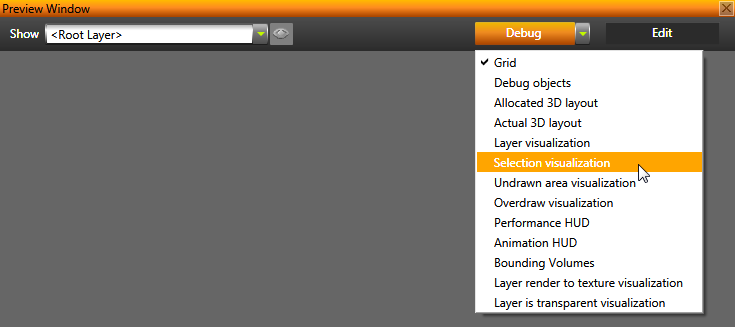
In addition to the Preview Debug mode, Kanzi provides additional ways to help you debug your application. See Measuring the performance of your Kanzi application and Best practices.
When in the Debug mode, click the drop down menu to select what you want to view in the Preview:
- Grid shows the grid. See Editing in the Preview.
- Debug objects shows visualization objects, such as lights and cameras.
- Allocated 3D layout shows bounding boxes of the spaces allocated to objects under layouts. See Layouts.
- Actual 3D layout shows bounding boxes of spaces used by objects under layouts. See Layouts.
- Layer visualization shows borders of layers. See
Layers.
- Selection visualization highlights the selected object. See Editing in the Preview.
- Undrawn area visualization shows the updating of the areas beyond the application screen and the areas with content not rendered.
- Overdraw visualization shows the overdraw of objects in your application. See Preventing overdraw with sorting filters.
- Performance HUD shows the overall performance statistics including:
- Animation HUD shows the animation performance statistics:
- Total time shows the amount of time used per frame for the execution of animation.
- Field Entries shows the amount of time used for the entry tree iteration.
- Samples(n) shows the amount of time used by animation data that consists keyframe interpolation for a single property attribute. The number in parentheses shows how many such animations were iterated.
- Blended(n) shows the amount of time used by animation data under Timeline Entry where Timeline Entry contains Blend Mode other than None. The number in parentheses shows the number of such samples.
- Layout total time shows the amount of time Kanzi Engine used for iterating the layout objects such as grid layout and stack layout.
- Currently running Timeline Entry graph. The smaller the graph, the faster the Kanzi Engine executes. It also shows if the graph has completed entries that still belong to the animation graph.
See Animations best practices.
- Bounding volumes shows the bounding volumes of geometry.
- Layer render to texture visualization shows whether a layer is rendered into a texture, and causing a framebuffer object (FBO) switch. See Rendering best practices.
- Layer is transparent visualization shows transparent layers in your application. See Setting layers for efficient rendering.
See also
Measuring the performance of your Kanzi application
Editing in the Preview
Preview
Open topic with navigation